(c) Copyright by OpusXenta Pty Ltd. All rights reserved.
Vote Summary
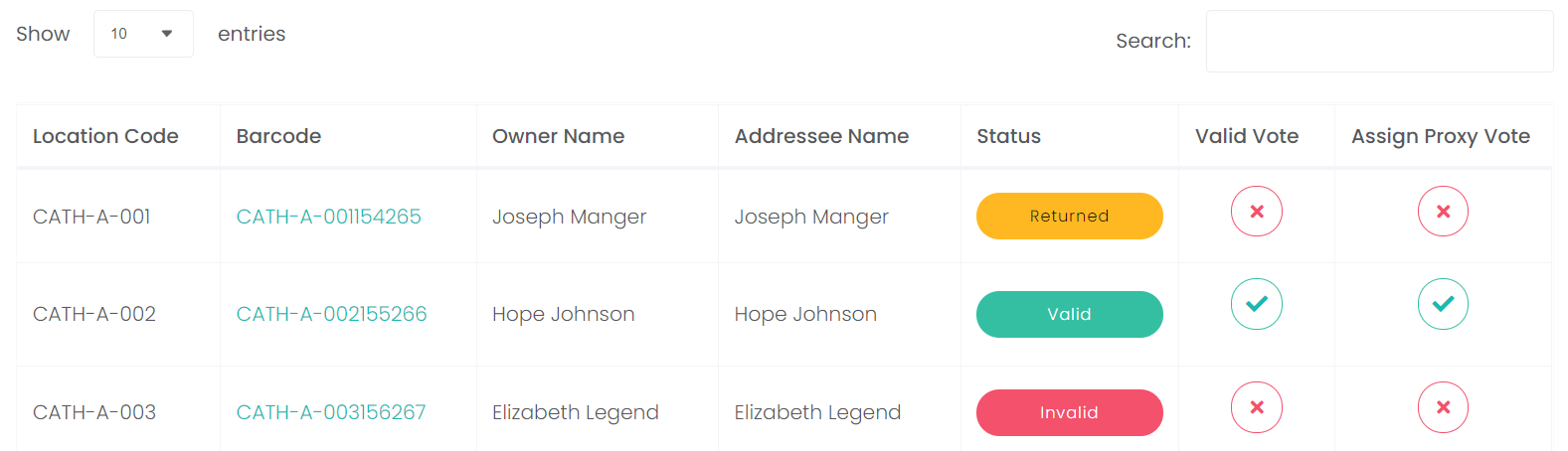
On the Vote Summary screen, all issued voting slips will display in the grid grouped by location.
The following information will display for each location:
The Location Code
Barcode, which serves as a hyperlink to the voting slip
Owner Name
Addressee Name
Status of voting slip
Whether the vote is valid
Whether a proxy vote is to be assigned for this location.
To narrow down the voting slips that display, type in the Search field part of a name or location code, the list will narrow as you type to display only responses which contain the text.
All votes will be summarised at the bottom of the screen by the following information:
Total Number of Lots
Total Number of Valid Votes
Total Number of Invalid Votes
Total Number of Proxy Votes Assigned
All votes will be assigned a status, which can be seen on both the Responses screen and the Vote Summary screen.
Status
Meaning
Vote slip has been printed, however, voter has not responded to date.
Response was returned, however, the vote slip is not valid.
Response was returned and is considered a valid vote slip.
Response was returned to sender / likely undeliverable.
If the response from all rights holders is valid, the Valid Vote box will have a green tick.
If one or more of the responses from one of the rights holders were not valid, the Valid Vote box will be marked with a red X.
If the responses from all rights holders are valid and a proxy vote is required, the Assign Proxy Vote box will have a green tick.
If one or more of the responses from one of the rights holders is not valid, or no proxy vote is required, the Assign Proxy Vote box will be marked with a red X.