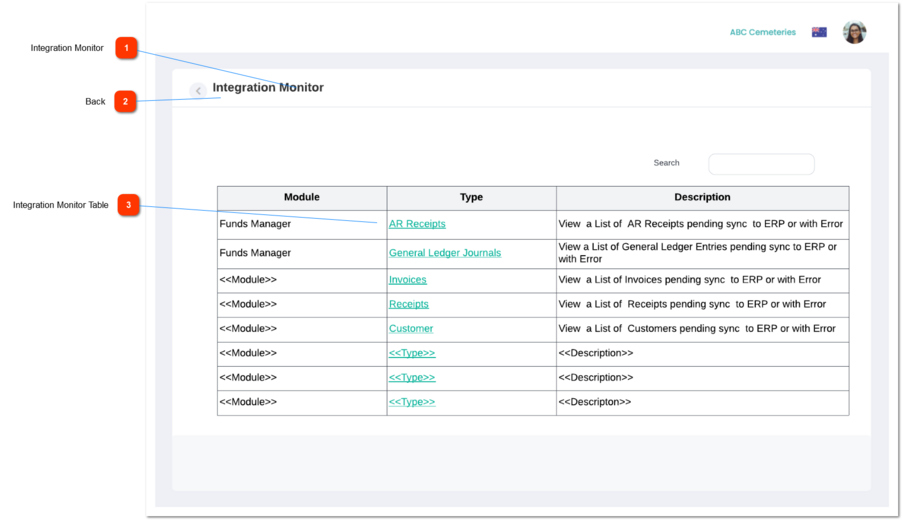
1. This table will list down the details of the Integration Monitor
Module
Type
Description
columns shown in the will be shown in this table.
5. This table allows the users to sort,
Module
Type
columns by ASC or DESC order. When sorting the columns by ASC order
6. The "Show <<drop down goes here>> entries" (placed at the top-left corner of the table) will allow the user to define the number of records to be shown/listed down per table page. By default, this will be 10 and other options will be 25, 50 and 100.
7. The "Search" text field (placed at the top-right corner of the table) will allow the user to search/filter records by the data in the columns
8. The "Table pagination" (placed at the bottom-right corner of the table) will allow the users to move to the other pages of the table.
9. If the system found records, show the text placed at the bottom-left corner of the table. The format of the text is; Showing <<Beginning record number of the page>> to <<Last record number of the page>> of <<total records count>> entries.
-
-
-
-
-
-
-
Table column
Column name will be "Module"
1.This column will list down the Modules of byondcloud
Funds Manager - for now.
(NB: This will be extended to Care Programs, RecordKeepr, MarketMakr, Floral Programs etc in the future)
-
-
Text
-
-
Yes
-
Table column
Column name will be "Type"
1.This column will list down the Type as anchored Text. Upon Clicking on this the user will be navigated to the relevant Type screen.
Under Funds Manager Module, the type(s) associated are as follows:
AR Receipts
General Ledger Journals
-
-
Text
-
-
Yes
-
Table column
Column name will be "Description"
1. This column will list down the Description of the Type.
Generic message that should be displayed is a follows :
View a List of <<Type>> pending sync to ERP or with Error