Phase Info, Phase, Task, and Sequence Planning
Task Manager phases are used to group tasks into a logical sequence of activities.
For example, the pre-service checks and activities to prepare a grave, and the post-service tasks to clean up the site.
Sufficient planning should be undertaken when you're creating the phase information in order to ensure the Phase Info, Phases and Tasks are linked and sequenced logically.
Consider the sequence phases need to be completed in, and within each phase, the sequence the tasks are to be completed.
A pictorial example is provided below to explain the links between phase info, phases, and tasks.
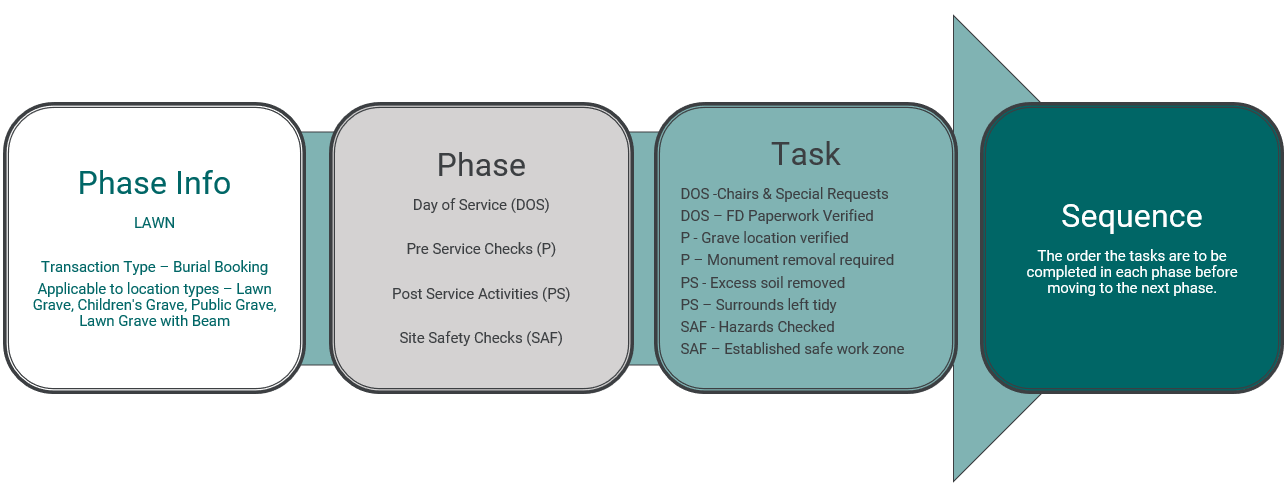
During setup, cemeteries will need to:
-
Create the Phases that will be applied to the Phase Info entry in Phase Management. During this step, the phases will also be sequenced.
-
Create their Phase Info entry via Phase Info Management, where tasks and phases will be linked to location and transaction types, and tasks will be sequenced to create a logical workflow.
To assist in planning your tasks, phases, and phase info entries before entering them into the Task Manager system, see Phase Information Examples.