(c) Copyright by OpusXenta Pty Ltd. All rights reserved.
Import Template
When creating a new map project, one of the key steps is adding your location data.
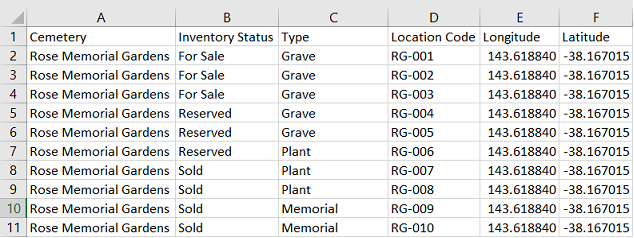
This is done by uploading a CSV / Excel template with Location Code, Longitude and Latitude data as a minimum.
The location code refers to the name of each plot / grave you want to map.
The longitude and latitude can be specific to each location or can be a generic longitude and latitude for the site if this information is not available.
Tip: You can move the positioning of the markers for each location once they have been imported into MapMakr.
You can also include additional fields in this template (as in the example below), which can then be used as map filters.
Map filters will help you view or filter selected locations within your map project. Refer to the topic Apply Map Filters for more information.