Funeral Director Configuration
This section will focus on the cemeteries and crematoria portal and specifically, how to set up an account for use by a funeral director.
This section steps the funeral director account administrator through the configuration of your account, company structure, security profiles and users to prepare your account to place online bookings.
Setups required for a Funeral Director to complete include:
Manage Account:
These setups are managed from the side menu options that display under Manage Account.
-
Account Configuration
-
Company Structure
-
Security Profiles.
Manage Users
Navigate to these by either using the Dashboard or the Side Menu Options.
Each of these setups will be explained now in detail.
Manage Account: Account Configuration
Within Manage Account: Account Configuration, be sure to confirm that your corporate details are correct.
Manage Account: Company Structure
Set up each branch of your funeral company within byondcloud within the Company Structure area.
|
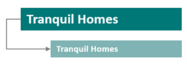
Sole trading funeral director with 1 contact address
|
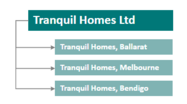
Head office with 3 branches in different counties.
|
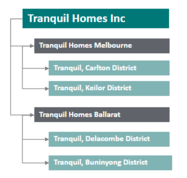
Head office with regional operations and multiple branches
|
|
One branch is required in the company structure, with the same address and contact details as the main account.
|
The head office is the main account, with separate branch and contact details for each county.
The head office details can repeat as a branch office.
|
The head office is the main account.
The 2 regions are marked as “logical” non-trading entries.
The 4 branches are inserted within their respective regions.
|
 |
 |
 |
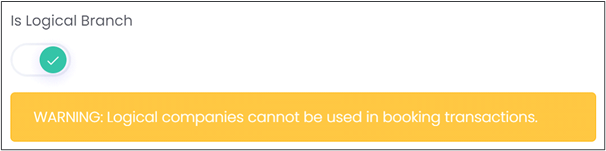
Remember: If your business has multiple branches in different regions of the country, you can insert “logical” (non-trading) branches into the structure to group these.
Security (Profiles & Permissions)
Users who can sign in to byondcloud to create & manage bookings will need to be set up, along with managing the actions each group of users can see and do by configuring their security profiles.
The default account user gets automatic permissions to all features. Each additional user is then set up by the default user.
The following functions which may be considered for a funeral director profile are:
-
Account Configuration
-
Bookings
-
Company Structure
-
Manage Users
-
Organisation Structure Permissions
-
Security Profile Function Permissions
-
Security Profiles
-
User Languages
Manage Users
Once security profiles are set up, create any users that will need access to byondcloud to create or manage funeral bookings and assign them to a security profile and the applicable territory.