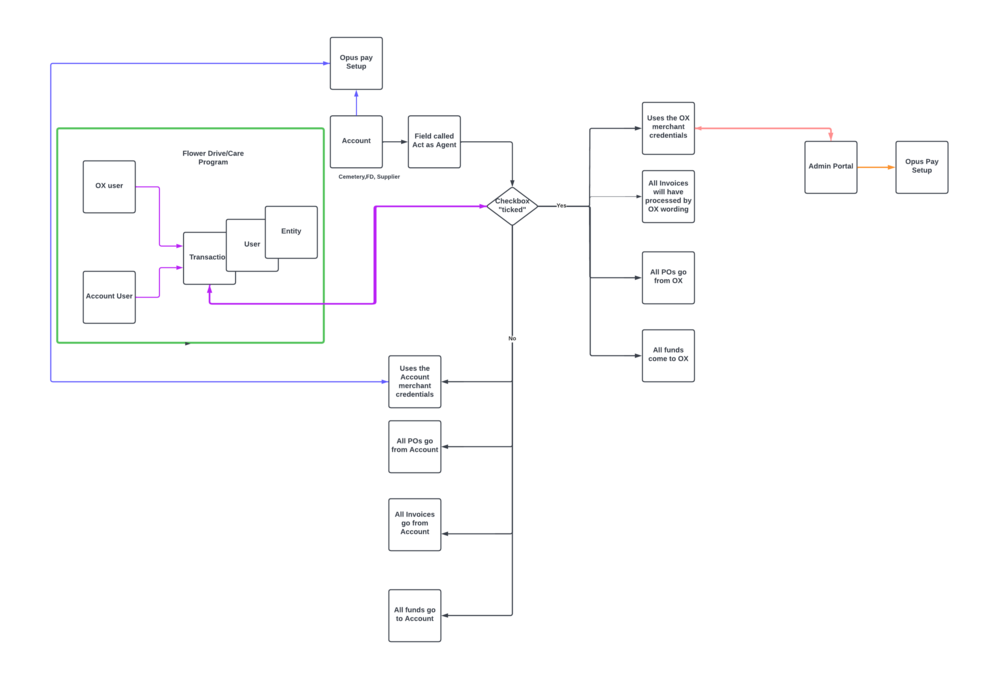
The workflow below depicts the scenario of OX managed Sales.
Its important to note that the Opus Xenta acting as an Agent and Opus Xenta Users running a Flowerdrive/Care Program/Recordkeeper or any transaction are two seperate functions.
Business Rules to follow:
Transactions fields updated to flag the transaction as a managed sale
· Dependent Modules : Flower Drives, Care Programs, RecordKeepr, marketmakr and any other module that creates transactions
Managed Sales Operational and transaction processing scenario:
If OpusXenta is asked to help setup and manage work on behalf of our customers (eg Cemetery or Funeral Home “Entity Account”) they will login to the customers byondcloud account via the Admin Portal.
When logged into the customer’s byondcloud entity account (eg ABC Cemetery) any transactions created or run on behalf of the customer by the OpusXenta user will be flagged as created by the OpusXenta user Userid and would include the OpusXenta Entity details.
These flags will be used to categorise the transaction – in the back end OpusXenta operations team will inspect transactions and process any flagged as created by an OX userid with an OpusXenta entity.
The customer entity account (eg ABC Cemeteries) will then be charged a transaction processing fee which is paid by the customer to OpusXenta for their work.
Examples of work OpusXenta staff can complete on behalf of customers would include setting up and running a flower drive or care program or recordkeepr bookings.
Ever transaction completed by OpusXenta staff for a customer’s account should be updated with:
· Agency flag (YES or NO)
· User ID = OX userid
· Entity ID = OpusXenta
|
TX DETAIL
|
TX DETAIL
|
|
TX DETAIL
|
|
|
|
|
|
|
|
userid
|
|
|
agency flag
|
|
|
|
|
|
|
|
Who Creates Flowerdrive
|
ENTITY ID
|
Transaction “Record Created by” Field -
|
Act As Agent
|
Merchant Id
|
Transaction descriptor
|
invoice processed by
|
PO from
|
funds come to
|
DELEIVERY ADDRESS
|
|
OX user
|
OPUSXENTA
|
Record – Field Created by OX, User Id
|
Yes
|
OX merchant Id used
|
Trans >> Agency
|
OX
|
OX
|
OX
|
Customer site
|
|
Cemetery user
|
Account - CEMETERY
|
Record - Field Created by Cemetery, User Id
|
Yes
|
OX merchant Id used
|
Trans >> Agency
|
OX
|
OX
|
OX
|
Customer site
|
|
OX user
|
OPUSXENTA
|
Record - Field Created by OX, User Id
|
No
|
Cemetery Merchant Id Used
|
Trans >> NOT Agency
|
Account
|
Account
|
Account
|
Customer site
|
|
Cemetery user
|
Account - CEMETERY
|
Record - Field Created by Cemetery, User Id
|
No
|
Cemetery Merchant Id Used
|
Trans >> NOT Agency
|
Account
|
Account
|
Account
|
Customer site
| |
Process to follow if "Act as Agent" tickbox has been checked (Yes) in the Byondcloud Entity.
In marketmakr OX will always be Agency on all transactions in omnea but for white label webstores OX can be both Agency or not depending on selection made by store set by the “Act as Agent” Flag.
All payment processing will be processed using the OpusXenta Merchant Account and Merchant ID (MID)
The transactions will be associated with a Customer Entity account Sub account (eg ABC Cemetery)
Customers can access this account to view all opuspay payment transactions processed using OpusXenta’s MID
Purchase Orders (PO):
All Purchase orders (PO’s) would be sent by the OpusXenta account entity, The PO would specify the Customer Accounts site delivery Address.
Pricing :
The pricelist used to price and sell an item would either be:
1. the default pricelist set by the supplier
2. or if the item supplier has created a custom price list for the customer ( Byondcloud customer Account entity).
|
NB : On Marketmakr Omnea transactions – it would for now also use the default/custom price lists
|
Work Orders:
Work orders are either :
1. created or the supplier (if the supplier must complete a task as part of the product or service. (eg. florist delivering flowers and placing them on a grave)
2. created for the Cemetery or Funeral Home if they are performing the placement or service ( eg place flowers on a grave).
Sample use cases follow :
Use case 1:
Scenario OpusXenta Sales person talking to current or new customer: these customers would probably only be running byondcloud, marketmakr and not byondpro
Sales : Would you like use OpusPay to allow payment processing in ByondCloud ?
Customer: – yes
Sales : Would you like to use OpusXenta’s Merchant account where OpusXenta would process payment transactions on your behalf for a small transaction fee.
Customer: – yes
Sales : Good, I can arrange that.
Please note there is a small fee of xx% associated with using OpusXenta’s merchant account to process transactions.
The benefit of using OpusXenta’s merchant payment account to process transactions is this will simplify setting up and running payment processing for you.
To enable that we need to set the “Act as Agent” flag in your account settings and you need to accept the current T&C’s
Customer: OK let’s set it up
Sales : Also as part of the Service OpusXenta provides for ByondCloud customers we can access your system to set up and running specific transactions for your business, like a virtual employee or virtual agent.
On your request an OpusXenta agent can, setup and run transactions on your behalf
eg set up and run a flower drive campaign, or setup a Care program etc
There is a small transaction based fee for OpusXenta to log in and set up transactions on your behalf, there is also a full audit trail and reconciliation detailing what transactions have been setup or run by OpsuXenta user and what fees are charged.
Customer: That sounds like a great service how do I know what transactions you run on my behalf ?
Sales: To put your mind at rest, OpusXenta would be acting as a virtual employee and would only do work on your behalf that is specifically requested, discussed and agreed and there would be a full audit trail.