Step 1: Export Location Data from byondpro
The first step is to export your location data from byondpro into a CSV template. This will most likely be completed by our Technical Team.
Location data may be for a specific area within your cemetery, for example, the Roman Catholic area. This will then be imported into MapMakr to create a Map Project for that area.
Once you have created your Map Project, you can arrange / pin multiple locations within that specific area at one time. For your reference, the minimum information required in this template is listed below:
|
Information Required
|
Description
|
|
Cemetery
|
This is the Cemetery / Site name e.g., Highview Remembrance Park.
|
|
Location Code
|
This is the location code / name e.g., HGH-ANGL-807-007.
|
|
Longitude
|
This can be the generic longitude of your site or a specific longitude if available.
|
|
Latitude
|
This can be the generic latitude of your site or a specific latitude if available.
|
You can also include additional fields such as Area or Type of Grave, which can then be used to filter your locations in MapMakr! Here’s an example of a CSV template below:
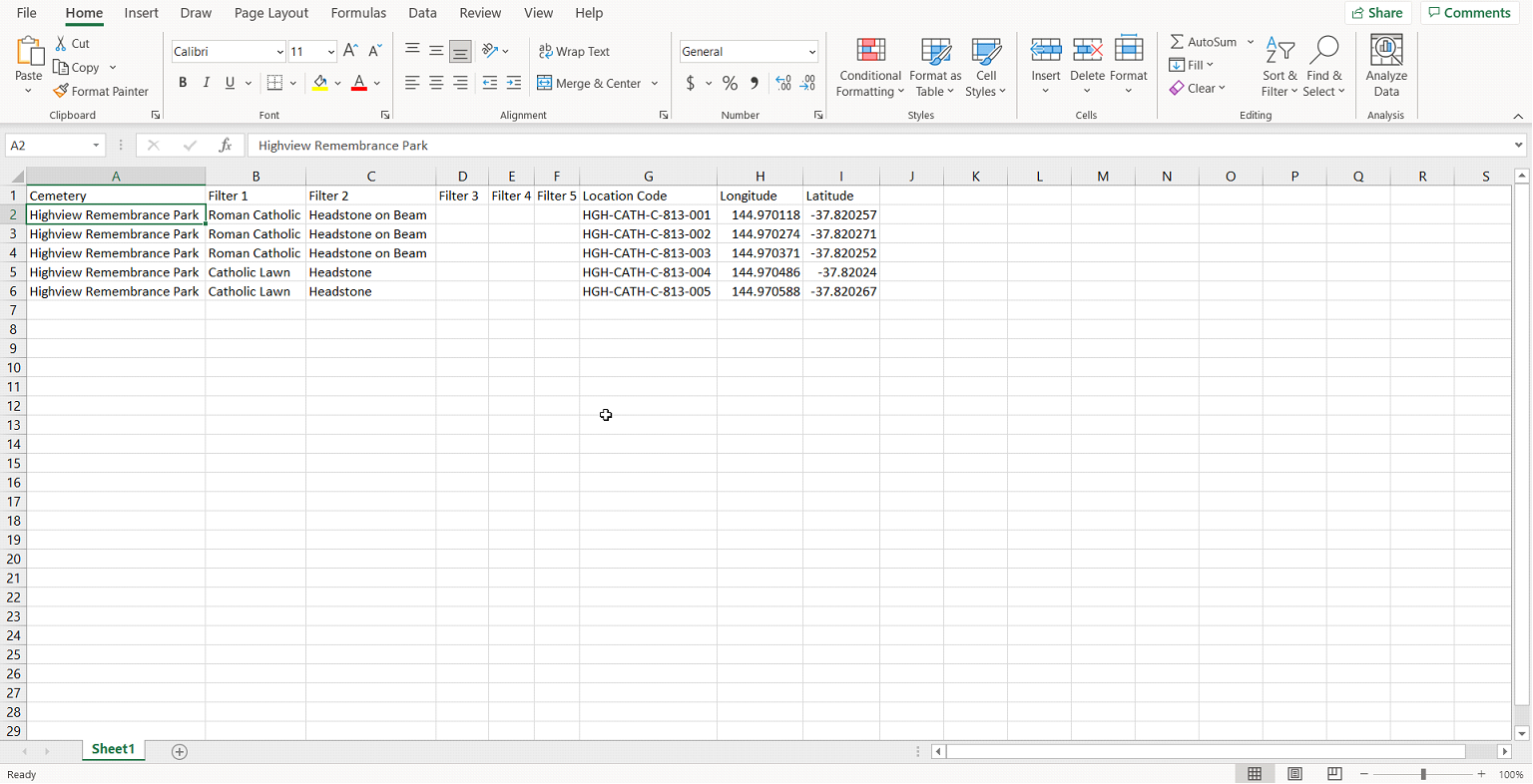
Once you have populated your template with the required data, save this document as a CSV or Excel file, ready to import into MapMakr.