(c) Copyright by OpusXenta Pty Ltd. All rights reserved.
Screen Category Transaction Types
You should have each screen category relate to the information that appears on the tabs of your Sales & Booking module, if integrated to byondpro.
The Deceased & Common Information Screen would more likely link to the fields which appear on the Summary tab of a Sales & Booking in byondpro. A screen category of Cremations Requirements for Cremation Services likely relates to the Bookings tab of your byondpro.
Click on Manage under the Screen Category Transaction Types icon.
Filter by Transaction Type.
In this example, we have chosen ‘Cremation Service.’
Choose the Search button.
The results display two screens.
Both are active and mandatory, meaning these screens will be presented to the Funeral Director during the booking process.
The Sort Order determines the order the screens appear.
With the sort order as displayed, Deceased & Common Information will appear first and Resource Appointments second.
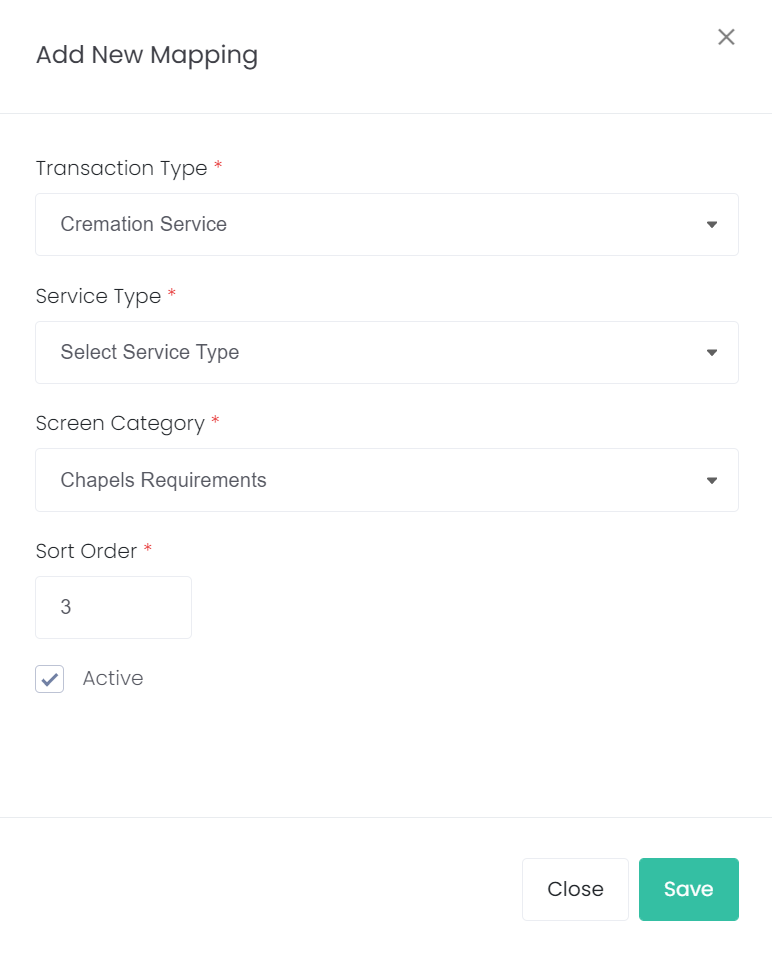
To build another page for the Funeral Director to complete, choose the Add New Mapping button on the top right of the screen.
If adding a new page, link it to the appropriate Transaction Type and the appropriate Service Type.
For our example, we created a page for Chapel Service so the Funeral Director can provide additional details that specifically relate to the chapel booking.
Give the page a Sort Order of 3, so it appears after the Resource Appointment Screen.