Ongoing Campaign
From the Manage Campaign section of Proxy Manager, search for or simply click on the hyperlink with the AGM year to access the campaign.
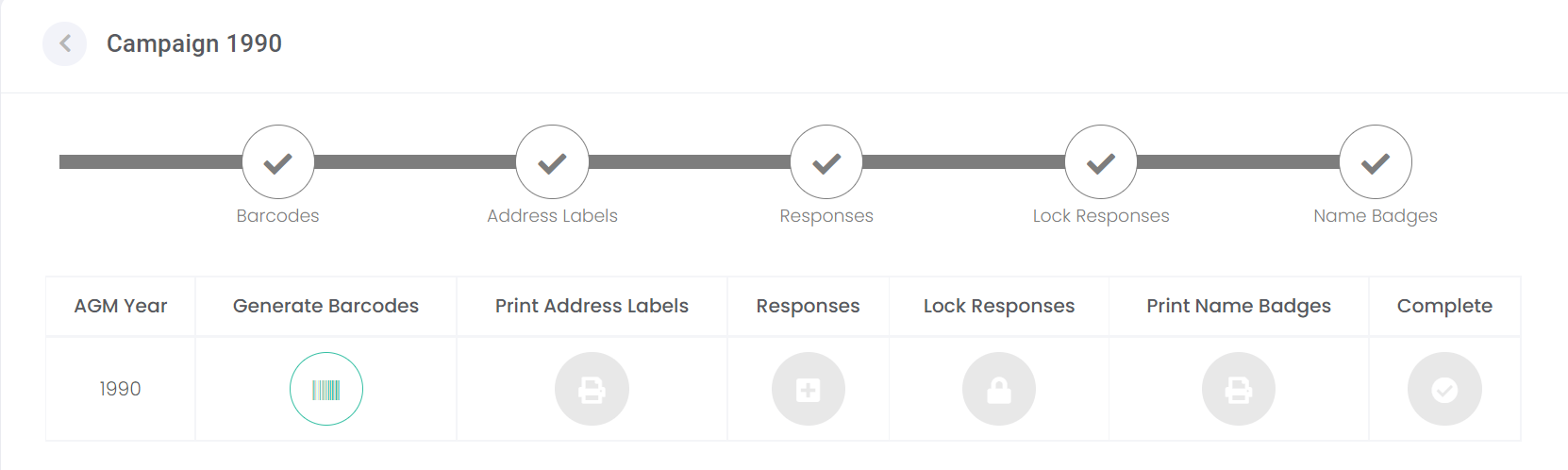
You will be presented with a process bar which indicates the stages of the campaign which have been completed to date.
To return back to the Manage Campaign screen at any point, click on the arrow next to the campaign year.
Action buttons on the bottom right-hand side of the page will allow you to perform further actions on the campaign, if necessary.
|
Delete
|
Will allow you to remove the campaign from byondcloud, only up until the barcodes have been generated.
|
|
Inactive
|
Will allow the campaign to be marked as inactive after Address Labels have been printed.
|
|
Vote Summary
|
Will allow the user to view a summary of vote slips only after at least one response has been recorded.
|
