Add Phase
Click the New Phase button at the top of the Phase Management page to open the Add Phase page.

This page is where you will setup phases for your teams to complete.
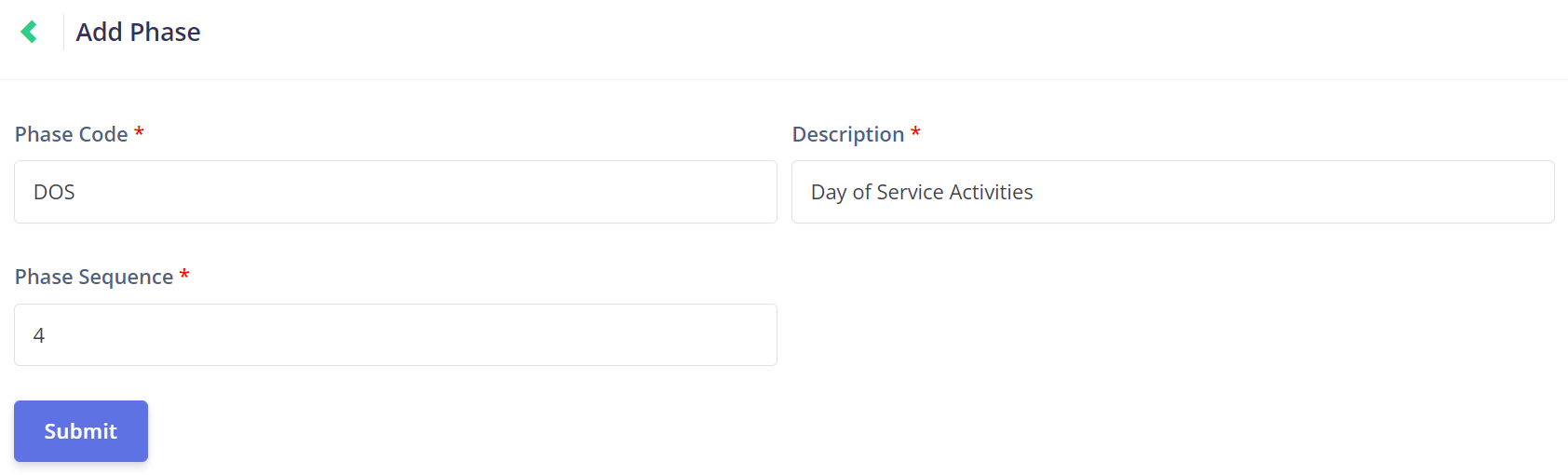
The Phase Code is a unique identifier that helps you to organise and locate your phase.
When choosing a new phase code, it is important to consider how the code can be used in conjunction with the task codes to ensure the right tasks are placed within the correct phases.
To continue with our example from the Add Task section, we will use the Day of Services Activities code of DOS.
This will indicate to us that the task codes of DOS01, DOS02, etc., are related to the phase code of DOS.

Next, choose a Description that will clearly identify which part of the job process the phase relates to.
In our example, we have the phase Day of Service Activities.
The user will know that Day of Service Activities will include tasks that are to be completed on the day of the job.

The Phase Sequence is the order in which the phase will appear on a job.
For example, the first phase of a burial booking job may be the Pre-Service Checks. Therefore, that phase will have the phase sequence of 1.
In the example used for the description, the Day of Service Activities have been given the phase sequence of 4, meaning it will be the fourth phase that the team will undertake.

Once all fields are complete, click the purple Submit button to save the new phase.